Cybercriminals don’t always “hack” into businesses—they often
log in using stolen passwords. Multi-Factor Authentication (MFA) is one of the most effective ways to reduce the risk of unauthorized access to your business systems.
Use the checklist below to evaluate whether your organization is adequately protected.
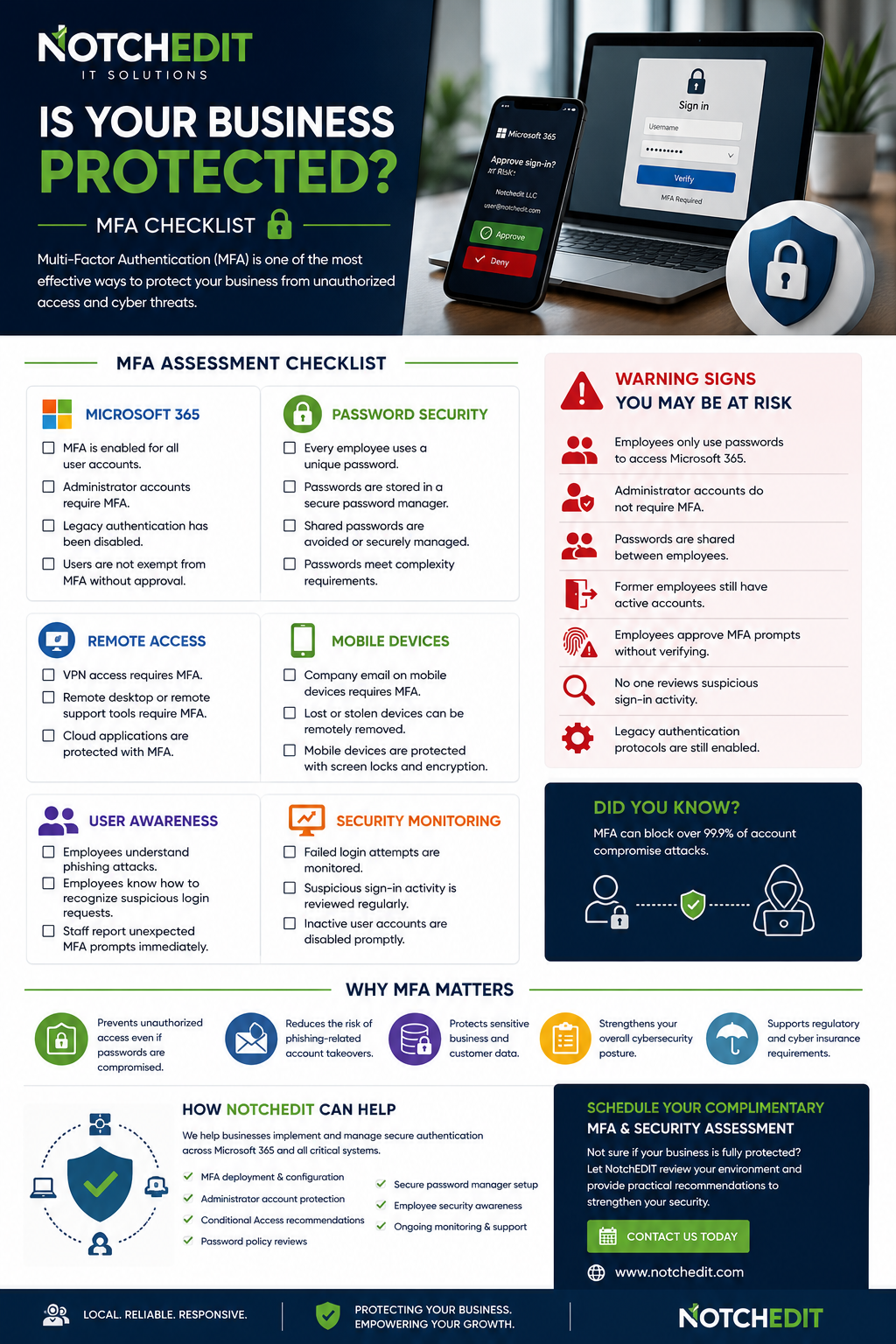
Multi-Factor Authentication (MFA) Assessment Checklist
Microsoft 365
☐ MFA is enabled for all user accounts.
☐ Administrator accounts require MFA.
☐ Legacy authentication has been disabled where possible.
☐ Users are not exempt from MFA without documented approval.
Password Security
☐ Every employee uses a unique password.
☐ Passwords are stored in a secure password manager.
☐ Shared passwords are avoided or securely managed.
☐ Passwords meet your organization’s complexity requirements.
Remote Access
☐ VPN access requires MFA.
☐ Remote desktop or remote support tools require MFA.
☐ Cloud applications are protected with MFA.
Mobile Devices
☐ Company email on mobile devices requires MFA.
☐ Lost or stolen devices can be remotely removed from company accounts.
☐ Mobile devices are protected with screen locks and encryption.
User Awareness
☐ Employees understand phishing attacks.
☐ Employees know how to recognize suspicious login requests.
☐ Staff report unexpected MFA prompts immediately.
Security Monitoring
☐ Failed login attempts are monitored.
☐ Suspicious sign-in activity is reviewed regularly.
☐ Inactive user accounts are disabled promptly.
Warning Signs Your Business May Be at Risk
- Employees only use passwords to access Microsoft 365.
- Administrator accounts do not require MFA.
- Passwords are shared between employees.
- Former employees still have active accounts.
- Employees approve MFA prompts without verifying they initiated the login.
- No one reviews suspicious sign-in activity.
- Legacy authentication protocols are still enabled.
If any of these apply, your business could be more vulnerable to unauthorized access or ransomware.
Why MFA Matters
Enabling MFA helps protect your business by:
- Preventing unauthorized access even if passwords are compromised.
- Reducing the risk of phishing-related account takeovers.
- Protecting sensitive business and customer data.
- Strengthening your overall cybersecurity posture.
- Supporting regulatory and cyber insurance requirements.
How NotchEDIT Can Help
NotchEDIT helps businesses implement and manage secure authentication across Microsoft 365 and other business applications.
Our MFA services include:
- Microsoft 365 MFA deployment
- Administrator account protection
- Conditional Access recommendations
- Password policy reviews
- Secure password manager implementation
- Employee security awareness guidance
- Ongoing security monitoring and support
Our goal is to make strong security simple, practical, and manageable for growing businesses.
Schedule a Complimentary MFA & Security Assessment
Not sure whether your organization is fully protected?
NotchEDIT offers a complimentary review of your Microsoft 365 environment to identify potential security gaps and provide practical recommendations to strengthen your defenses.
Protect your business before an attacker finds the weak spot.